
TablePro 0.69: Undo a Save That Already Committed
TablePro Team
On this page
TablePro 0.69 is out: 113 changes, 98 of them fixes.
The headline is a thing databases do not give you, so the app has to keep it itself.
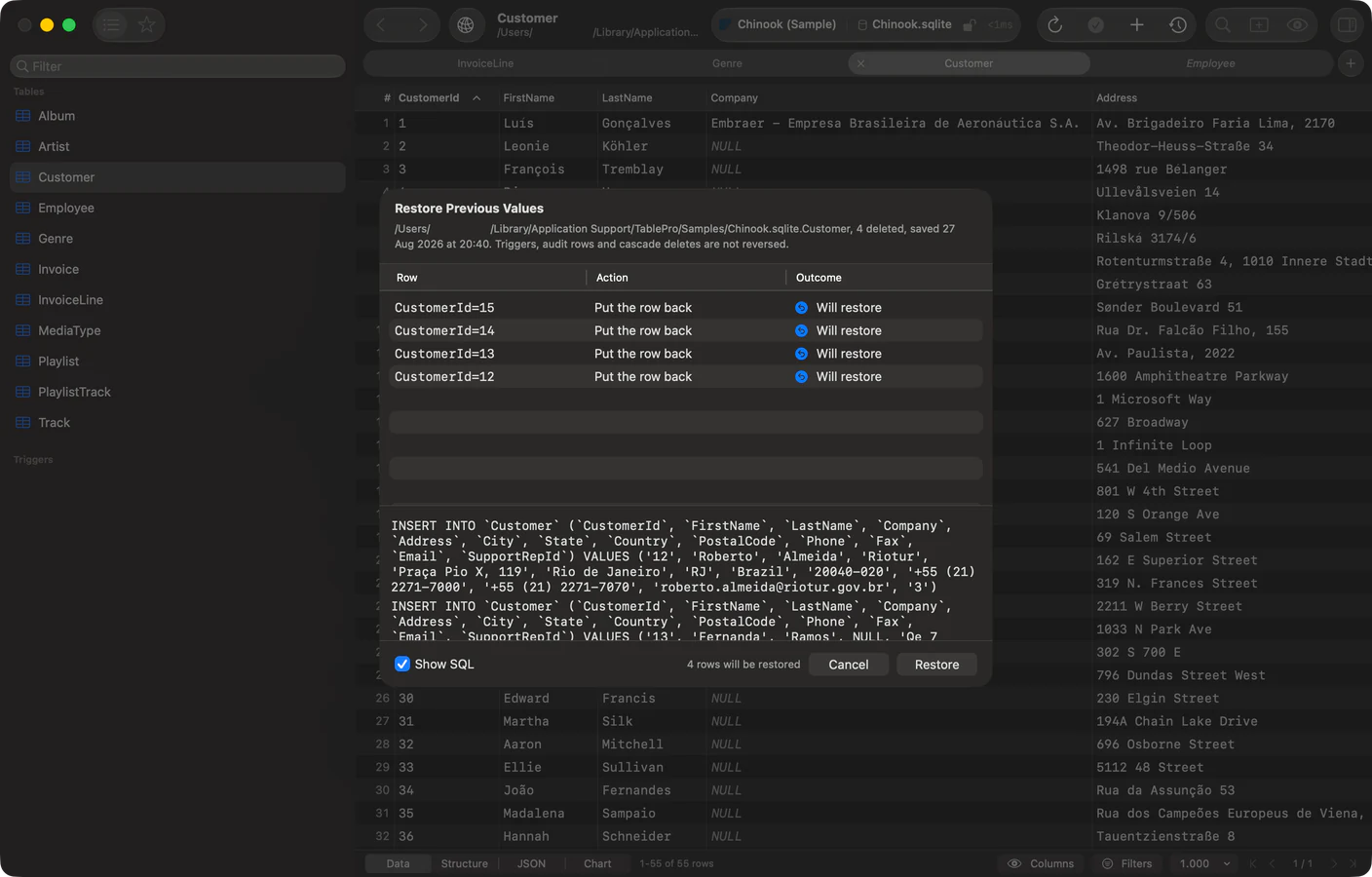
Taking back a save
#Cmd+Z stops working the moment you hit Save. The transaction closed, the undo stack is about the grid, and the values you replaced are gone.
Edit > Restore Previous Values… opens the saves TablePro still holds and writes the old values back. It covers an edit, a delete and a pasted batch, and it is in the toolbar's Table Actions group too. Before anything runs you get the sheet above: which rows, which columns, and what each one goes back to.
It reads the row before writing to it. If someone else changed that row since your save, the restore stops on it rather than overwriting their work.
The records are encrypted with a key in your keychain, because a pre-image is production row data and the first thing TablePro writes to disk that is. They are kept for 7 days, capped at 32 MB, 50 saves per table, and 1 MB per value. Losing the key loses the history, which is the right trade for something that is a convenience and never a backup. Turn the whole thing off in Settings > Data & Results, and clear what is stored from the same place.
Needs a license. Both tiers include it.
Check constraints and generated columns
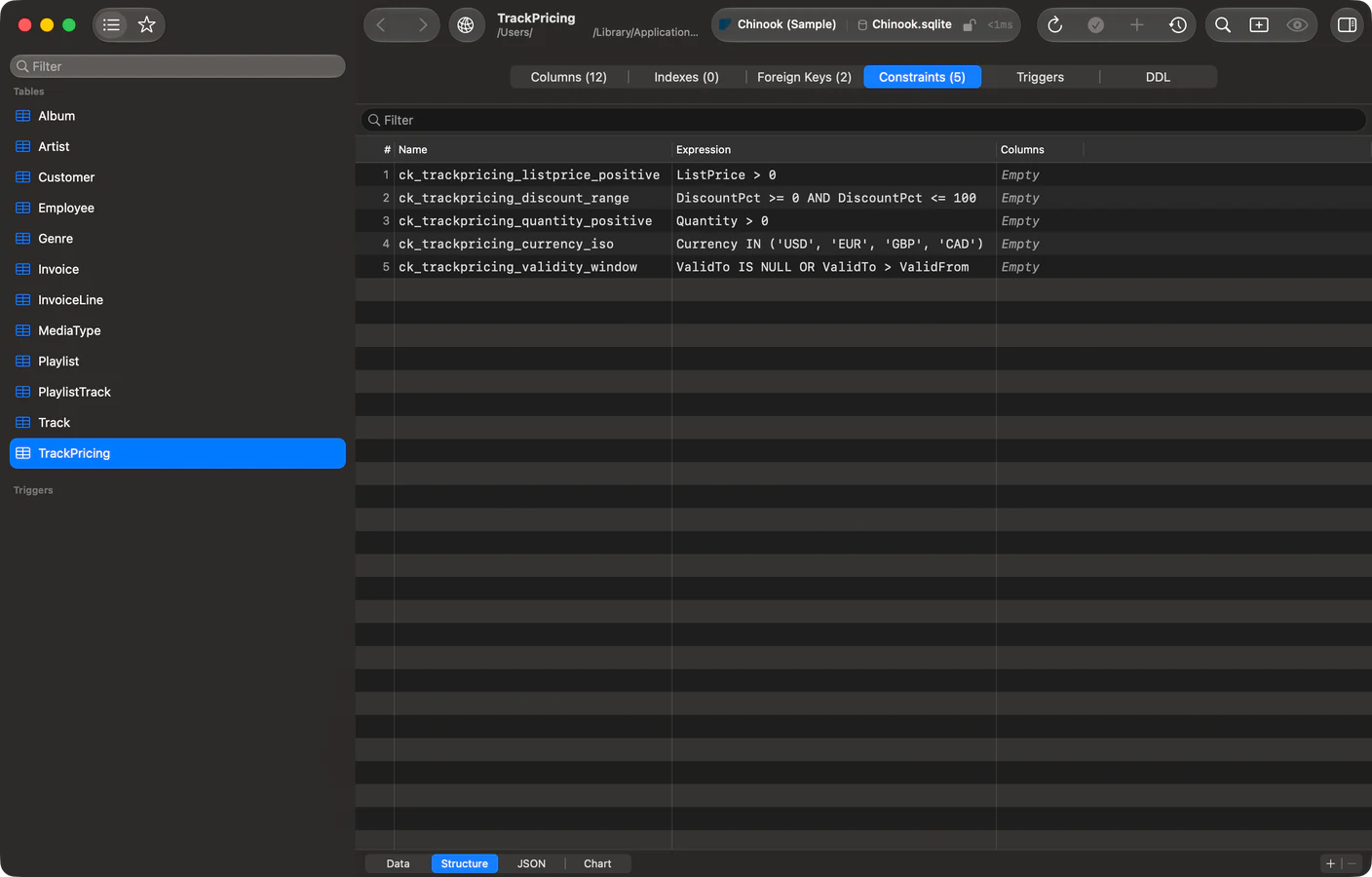
#The structure editor gains a Constraints tab listing check constraints with their expression, on MSSQL, MySQL, PostgreSQL and SQLite. You can add, drop and rename them on the first three.
Columns gain Generated and Expression fields with a stored or virtual choice, on MySQL, PostgreSQL and SQLite. TablePro always writes the keyword rather than leaning on the server's default, because the engines disagree about what it is: PostgreSQL 17 and earlier reject VIRTUAL outright, PostgreSQL 18 made it the default, and MySQL and MariaDB have defaulted to it all along.
MCP clients see both. describe_table now returns check_constraints and generation_expression.
A SQLite file on a server
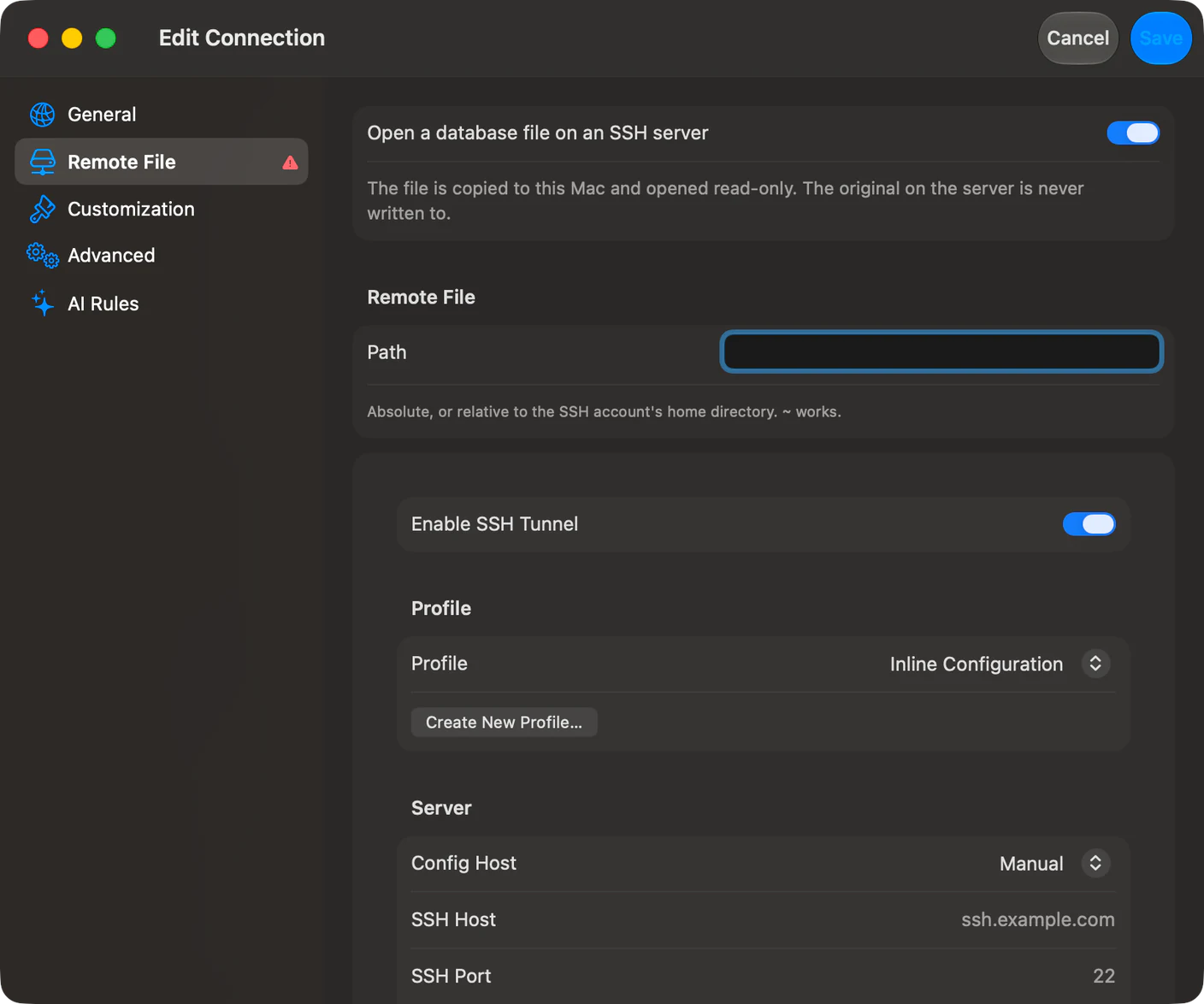
#SQLite connections gain a Remote File pane: point it at a database that lives on an SSH server and TablePro opens a read-only copy locally.
How it takes that copy depends on what the server has. If its sqlite3 supports VACUUM INTO, TablePro uses it, which SQLite documents as safe while other processes are writing. Measured here: a snapshot taken that way passed integrity_check while 22,518 transactions committed against the source. Otherwise it copies the bytes, along with any write-ahead log beside them, and that is correct only while nothing else is writing.
The copy is fingerprinted on the main file and the -wal together. A WAL-mode commit lands in the log and leaves the main file's size and modification time untouched until a checkpoint, so watching only the main file reports "unchanged" for a database that has been written to all afternoon.
Rename in place
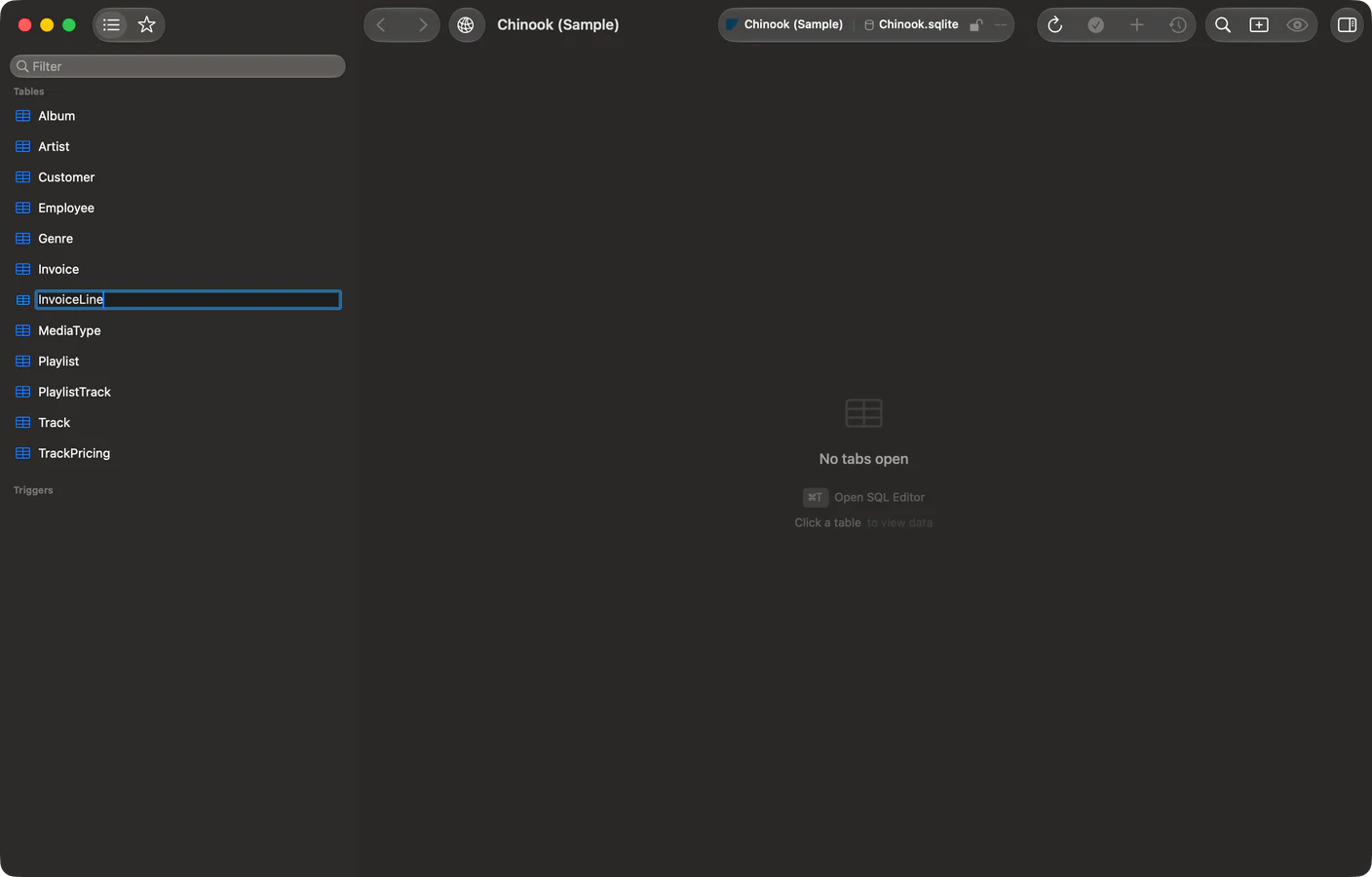
#Rename is on a table's right-click menu in the sidebar, and edits the row's label where it sits. It works on BigQuery, ClickHouse, Cloudflare D1, Dameng, DuckDB, LibSQL, MongoDB, MSSQL, MySQL, Oracle, PostgreSQL, Snowflake, SQLite, Teradata and Trino.
Databases rename on ClickHouse and PostgreSQL. Schemas rename on PostgreSQL, Snowflake and Trino. The rows that cannot rename do not offer the item.
The editor's selection
#Selection in the SQL editor got fourteen fixes. The highlight went missing from part of a long selection after you scrolled back to it, covered only the first line of a match spanning several, and painted in the accent colour in a window that was not active. Shift+Arrow extended the wrong end of a selection you had dragged. Shift+double-click and Shift+triple-click did nothing at all. Double-clicking =, < or > selected nothing.
Drag-select scrolled faster on a mouse than on a trackpad and stalled mid-drag, and a quick drag started a few characters away from where you pressed. VoiceOver was told every selection covered one line, and was not told when it moved.
Also new
#- A connection opens full screen on iPhone and iPad, with its four sections in a sidebar on iPad.
- Editor tabs are drawn as a segmented tab picker on every macOS version, so the active one reads clearly in light appearance and in a background window.
- Turso is its own engine in the New Connection picker, offered before the libSQL plugin installs.
- The Find shortcut is rebindable in Settings > Keyboard, for giving
Cmd+Fto the filter bar instead. - A rebound shortcut can no longer silently kill Quit, Minimize, Hide, Settings, Show Toolbar or Enter Full Screen.
- Insert Row on iPhone and iPad stopped writing every column, so a
NOT NULLcolumn with a default inserts.
What it will not do
#Restore Previous Values refuses more often than you might expect, and says why on each row rather than skipping it quietly.
It needs a primary key, because without one a pre-image cannot name a single row. It gives up on a save that also truncated or dropped a table. It will not restore a row whose column was written with DEFAULT or NOW(), because the value the server stored was never read back. Same for a row the server assigned the key to. A value over 1 MB was never captured. A binary key cannot be written as a filter, so the row cannot be read back and checked first.
A row nearly restored is worse than one refused, because you believe the first one.
Getting it
#TablePro > Check for Updates, or download it.
If you use MSSQL, MongoDB, Oracle, Snowflake, BigQuery, DuckDB, LibSQL, Cloudflare D1, Dameng, Teradata or Trino, update those plugins too. Rename ships in the driver.
The full changelog has all 113 entries.
Related pages
Full release notes
Available for Mac, iPhone and iPad.
Download for Mac