
TablePro 0.73: Copy a Table Into a Different Engine
TablePro Team
On this page
TablePro 0.73 is out: 231 changes, 163 of them fixes.
Most of it lands in three places: moving data between databases, setting one up, and editing a SQLite table.
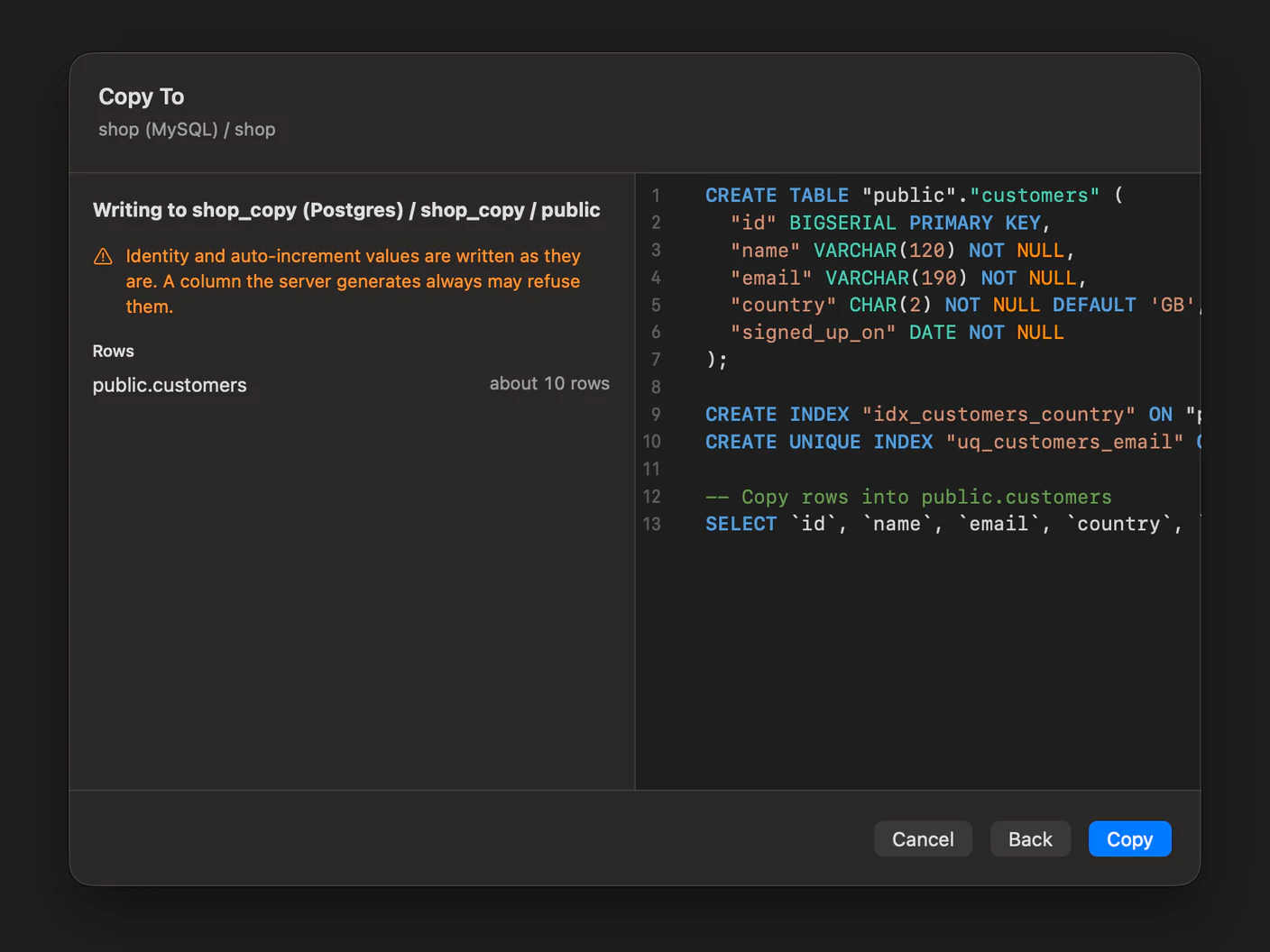
Copy a table into another engine
#Right-click a table and pick Copy To…. The destination picker walks connection, then database, then schema, and the connection you land on does not have to run the same engine as the one you started from.
Rows stream between the two connections in batches, so a table larger than memory costs the same as a small one. When both sides turn out to be the same connection, the copy runs server-side as INSERT … SELECT instead of pulling every row through your Mac.
Nothing is written until you have read the script. Continue reads both databases and shows the DDL, the row count each table expects, what was left out, and the types it could not carry over exactly. A MySQL TINYINT(1) arriving in PostgreSQL is a decision, and you get to see the decision before it runs.
Each table takes its own WHERE and row limit from the funnel beside it, so you can copy last month rather than everything.
The connection editor, and a tunnel that runs a command
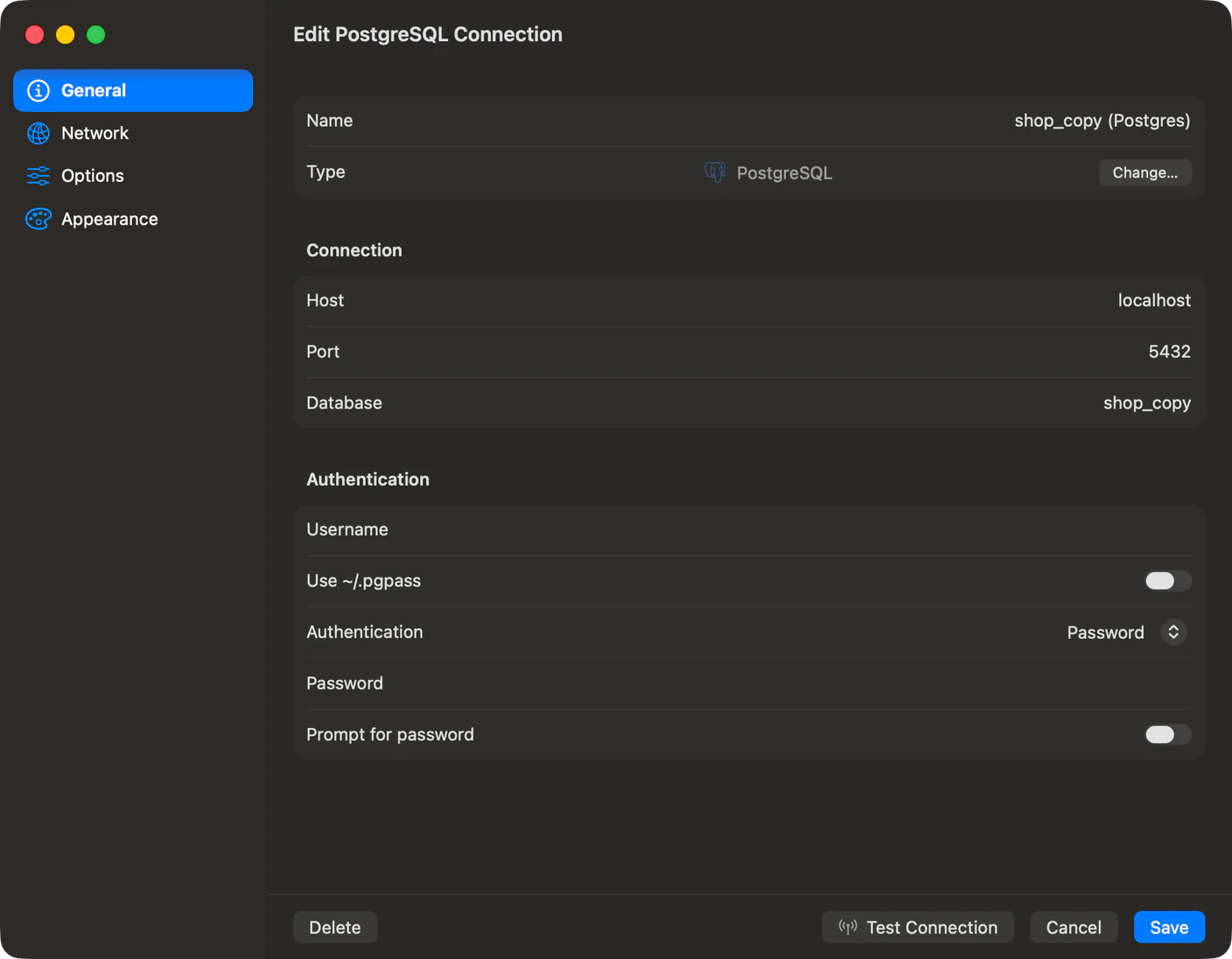
#The editor was up to eleven panes. It is four sections in a sidebar now, the same four for every driver: General, Network, Options and Appearance. Test Connection, Cancel and Save sit on a bar along the bottom, and when Save is dimmed the reason sits next to it, prefixed with the section holding the empty field.
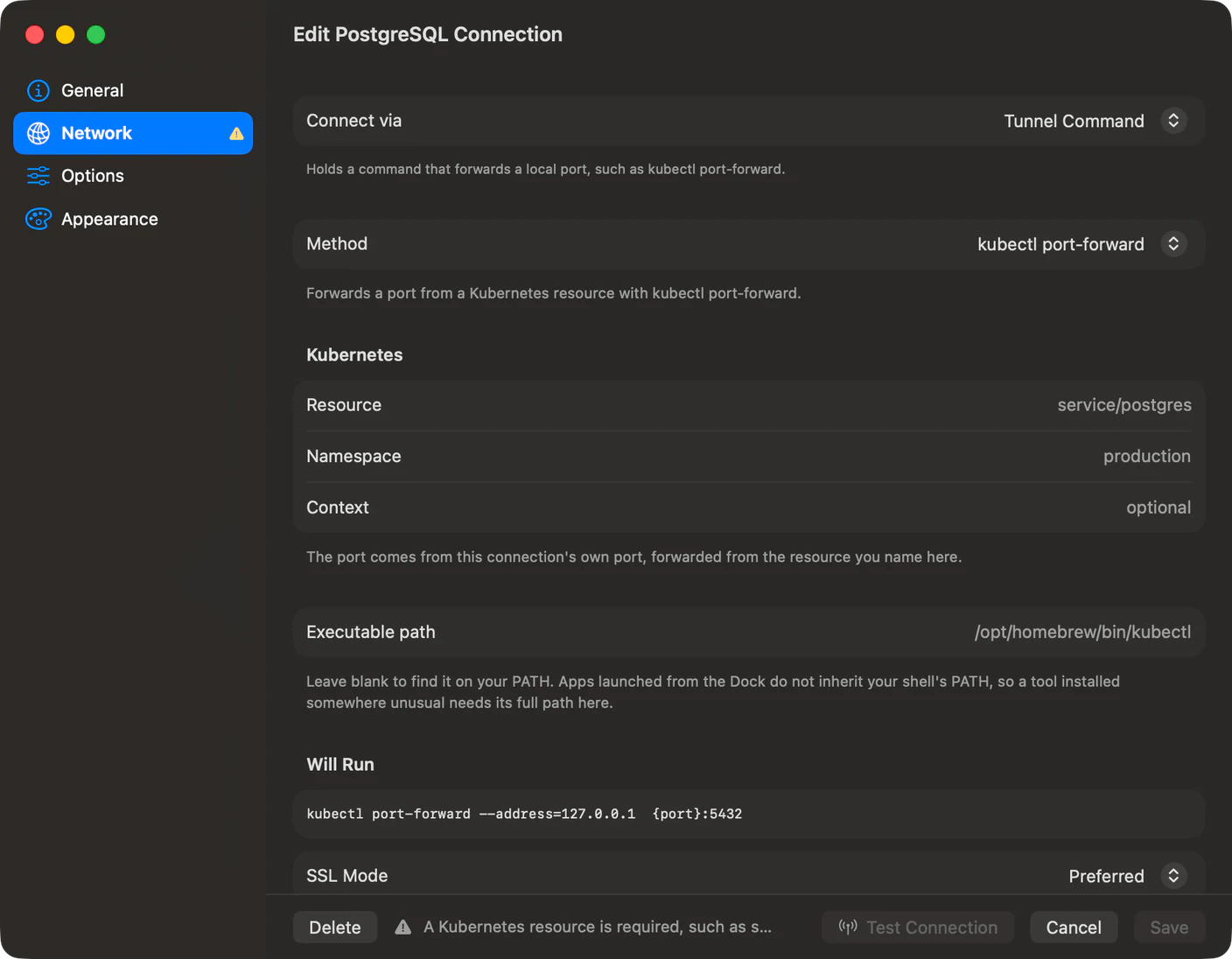
Network is where the five Enable switches went. Connect via is one picker now, listing Direct, SSH Tunnel, Cloudflare Tunnel, Cloud SQL Auth Proxy, SOCKS Proxy and Tunnel Command, because a connection only ever used one of them. Turning two on used to reach the database with neither applied.
Tunnel Command is new. A kubectl port-forward in a terminal is a window you cannot close and a tab you have to notice when it dies. Put it in the connection and it starts on connect, stops on disconnect, and comes back on its own. Two presets take named values rather than a command line, kubectl port-forward and aws ssm start-session, and Custom Command takes whatever you write, with {port}, {host} and {remotePort} substituted before it runs. Both presets look the tool up on PATH with /usr/local/bin and /opt/homebrew/bin added, because an app launched from the Dock does not inherit your shell's.
SQLite can edit foreign keys and column types
#No SQLite version can add or drop a foreign key with ALTER TABLE, so TablePro recreates the table. It carries the rows over with their rowids, puts the indexes and triggers back, and ends in a PRAGMA foreign_key_check scoped to the table: rows that do not match the new key roll the whole rebuild back and the error names how many.
Column type, nullability and default changes take the same route, and a column renamed or dropped in the same save runs as its own ALTER TABLE afterwards, so the new name reaches every index, trigger and view.
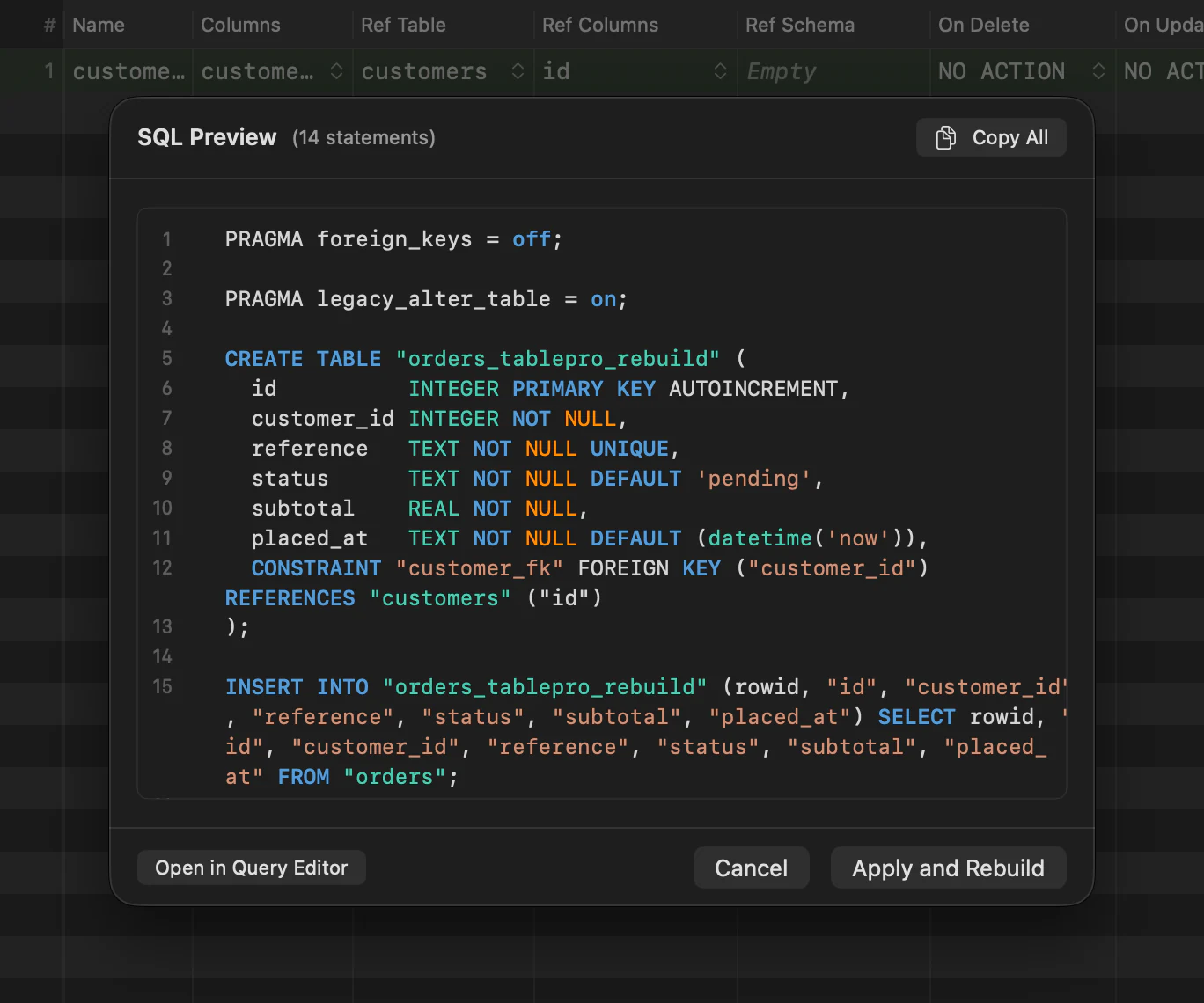
The Foreign Keys tab also stopped offering Add and Remove on engines that cannot do either, and stopped offering referential actions the engine rejects.
The toolbar and the row inspector
#The toolbar is five icon-only groups, with the connection and the container as one centred control that switches either. Query duration and Stop moved down to the results status bar, where the query is.
The row inspector puts the column name and type on one line and the value at full width below it, which is the shape a long value needed. Every field carries a value menu with Ctrl+Option+N for NULL and Ctrl+Option+D for DEFAULT, Tab moves between fields, and there is a search field and an edited-fields-only filter above them. The Assistant is its own pane now rather than a tab in the inspector, on View > Show Assistant or Cmd+Option+A.
Toolbar arrangements reset once on first launch, to the new default set. A customised toolbar from 0.72 does not survive.
Also new
#- Typesense driver: collection browsing, document editing, a REST request console, API keys in Users & Roles, and Server Dashboard metrics. Install it from Settings > Plugins
- DuckDB backup and restore: one
.duckdbfile or a folder of Parquet, plus Release File Lock, an Open the File Read-Only option so several processes share one file, and per-connection idle release for DuckDB and MySQL - Indexes in SQL exports, written after the data, with a materialized view's indexes written once the view exists
- A bar column in the EXPLAIN tree, with a Metric menu for self cost, self time and row counts
- Image preview beside the source for a cell holding SVG or a raster image
- Encoding and byte order mark options for CSV export, with a warning naming what the encoding dropped
- A sort direction setting, which sets the default row sort and which way the first header click sorts
~/.ssh/config, read properly
#
Eleven separate parsing bugs are gone. %h, %p and %r reached the connection as literal text. An Include line naming more than one file read none of them, and the same file included from a second Host block contributed nothing. Match !host and the other negated criteria matched every host. Match final overrode values earlier blocks had already set, and a later Match block dropped the IdentityFile entries from earlier ones. A jump host's own ProxyJump was not followed, so a chained bastion was never reached.
What it will not do
#Copying inside one engine drops generated and computed columns from the write, because the server recomputes them and every engine that has them rejects an INSERT naming one. Crossing to another engine they arrive as ordinary columns holding the values they had.
On Turso, remote libSQL and Cloudflare D1, TablePro shows you the rebuild script but does not run it. Each statement there is its own HTTP request, and nothing can hold a rebuild in one transaction.
The Constraints tab's + and - need SQLite 3.53.0 or later, the release that added ADD CONSTRAINT and DROP CONSTRAINT. The driver links the system SQLite, so the version is whatever your macOS ships. On an older one the constraints still list, read-only.
Changing a primary key on an existing table still does nothing on SQLite, libSQL, ClickHouse, Oracle and Trino.
Getting it
#TablePro checks for updates on its own, or TablePro > Check for Updates… now. A fresh copy is on tablepro.app.
This release moves the plugin ABI to version 25. The change is additive, so the plugins you have keep working. Reinstall the SQLite, libSQL, Cloudflare D1, MSSQL, Oracle, Dameng, Cassandra and DuckDB drivers from Settings > Plugins to pick up the index and constraint export fixes.
Related pages
Full release notes
Available for Mac, iPhone and iPad.
Download for Mac