
TablePro 0.74: Draw a Geometry Column on a Map
TablePro Team
Correction, October 2, 2026
The Map view loads its map tiles from Apple, so this post overstates what stays on your Mac. Your rows stay on the Mac; Apple serves the map tiles for the area on screen.
On this page
TablePro 0.74 is out: 270 changes, 228 of them fixes.
The new work is spatial results, row colouring and invisible characters. The fixes are mostly one thing: commands that ran against the wrong database.
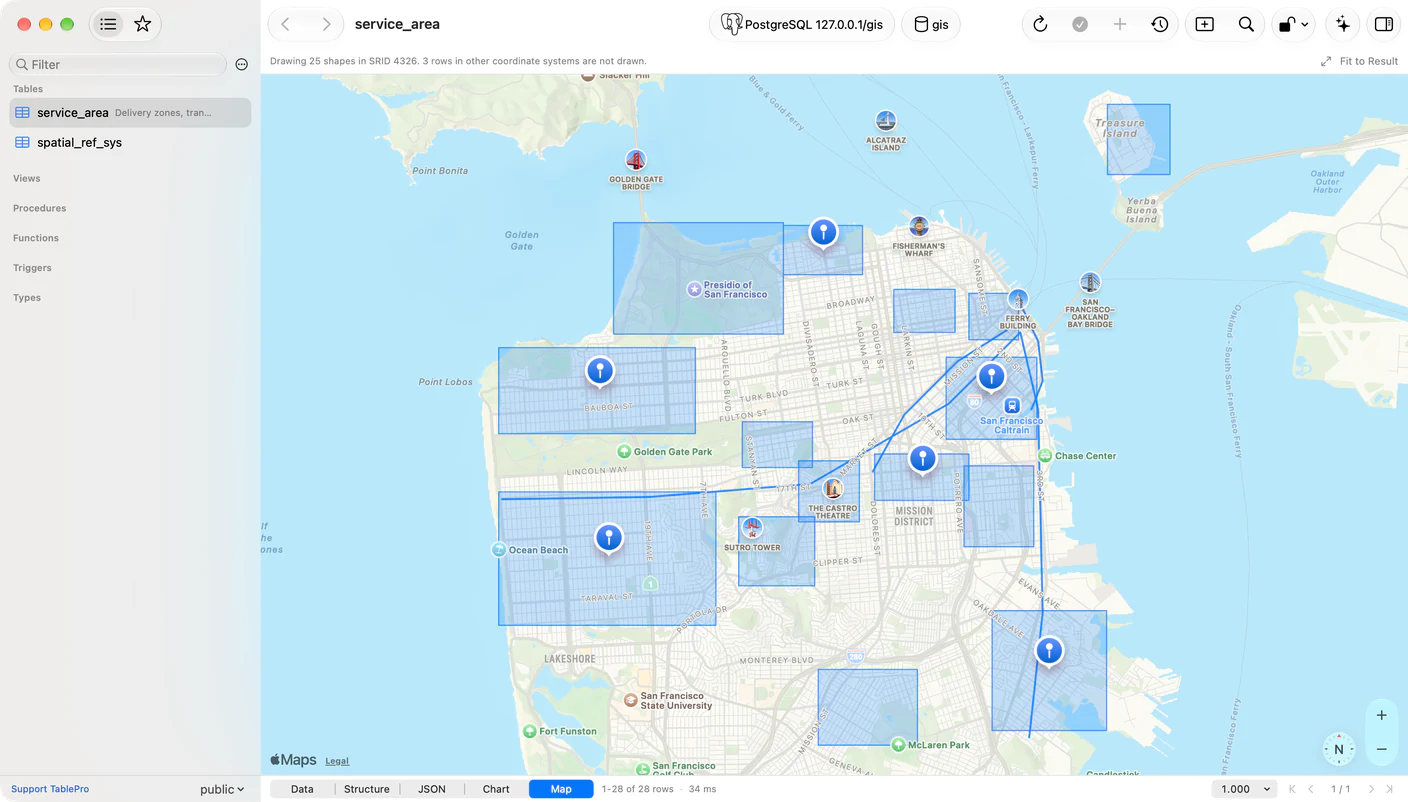
A map for spatial rows
#A Map segment appears in the results switcher when a column of the result holds geometry. A geometry, geography or geo_shape column usually does, and so does a MongoDB field holding GeoJSON, which arrives typed as JSON.
Values are read as WKT, EWKT, WKB and EWKB hex, GeoJSON, ClickHouse point and ring tuples, and all six spellings of an Elasticsearch geo_point, so PostGIS, MySQL, MariaDB, MongoDB, Snowflake, Elasticsearch and ClickHouse draw with no setup. Points, lines and polygons go over Apple's own tiles, and nothing about the result reaches a third-party tile server.
Click a shape to select its row, then switch to Data to find it selected in the grid, and the other way round. Fit to Result frames everything drawn. The toolbar says what it skipped: Drawing 4,102 shapes in SRID 4326. 88 rows in other coordinate systems are not drawn.
The database a command runs on
#An editor tab binds to its own database. The sidebar can be browsing a different one. For a long list of commands, the sidebar's was the one that won.
New Table created the table in whichever database the sidebar had moved to. New Trigger pre-filled a template naming it, and Drop Trigger named it in a statement it then ran somewhere else. Show All Tables listed that database. Sidebar Refresh reloaded from a container nobody was browsing. An import listed one database's tables, mapped their columns, and wrote the rows to another. ClickHouse Drop Partition and Detach Partition hit it, without the destructive-statement confirmation. describe_table over MCP answered with one database's columns beside another's indexes, foreign keys, row count and DDL.
The structure editor was worse, because it reads while you type. Ref Table came back empty on eight engines. Ref Columns read the sidebar's database, and after one failed read offered only Custom… for the rest of the tab, with no error and no retry.
On MySQL and MariaDB the driver used the session's database for catalog reads outright, so a read of an object in another database answered about the current one's same-named object. All of it now names the database it means. A pooled metadata connection is also put back on the database it was asked for.
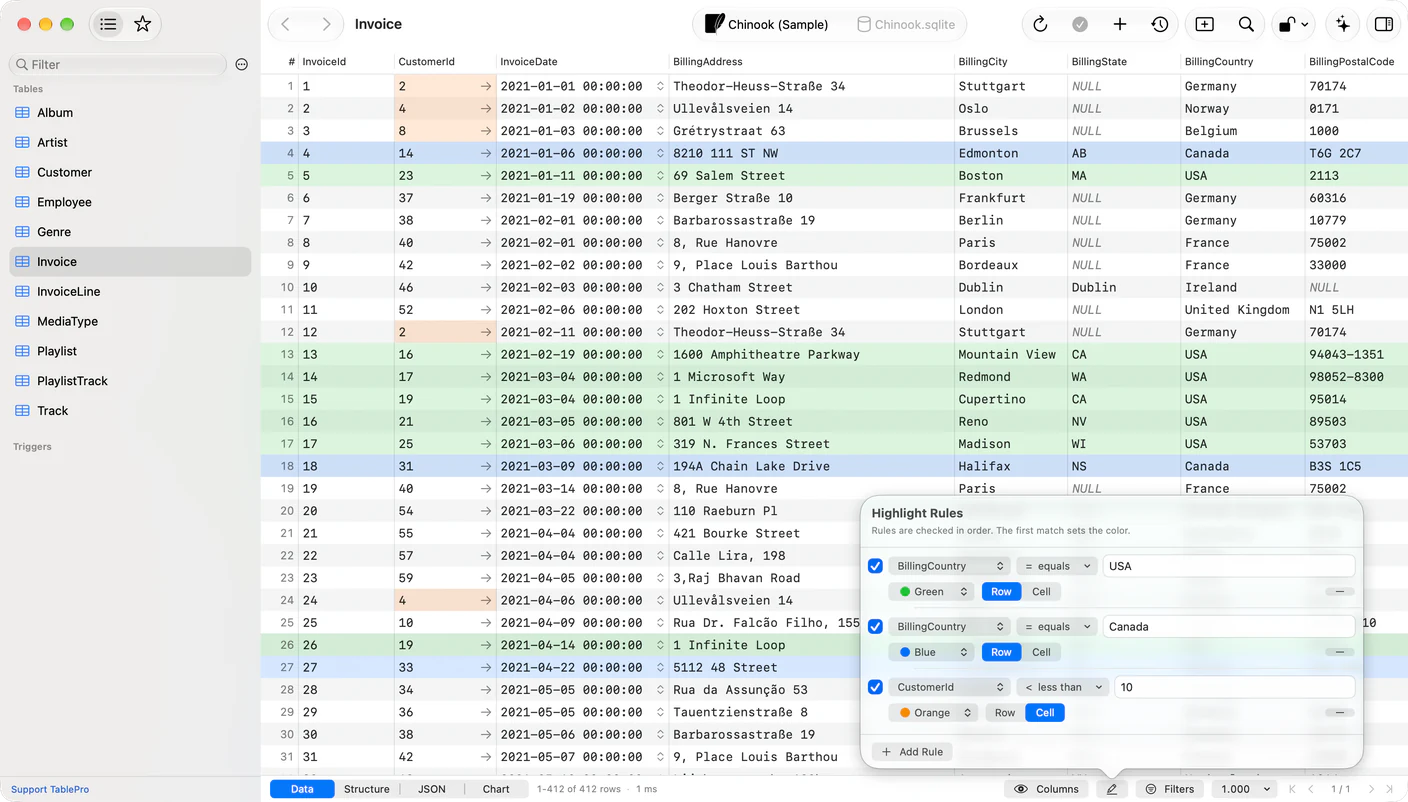
Colour rows by what is in them
#Right-click a cell and open Highlight for an exact match: a colour under Rows Where tints every row holding that value, one under Cells Where tints only that cell. For anything else, use the highlighter button in the status bar or View > Highlight Rules. A rule is a column, an operator from the filter bar, a value, a colour, and Row or Cell.
Rules read the stored value, not the text a Display As format shows, so a numeric column compares as numbers and a boolean column accepts true, 1, t and yes alike. NULL never satisfies a comparison, so match it with is NULL or is empty.
Rules belong to the table, scoped to the connection, database and schema, and follow it through a rename.
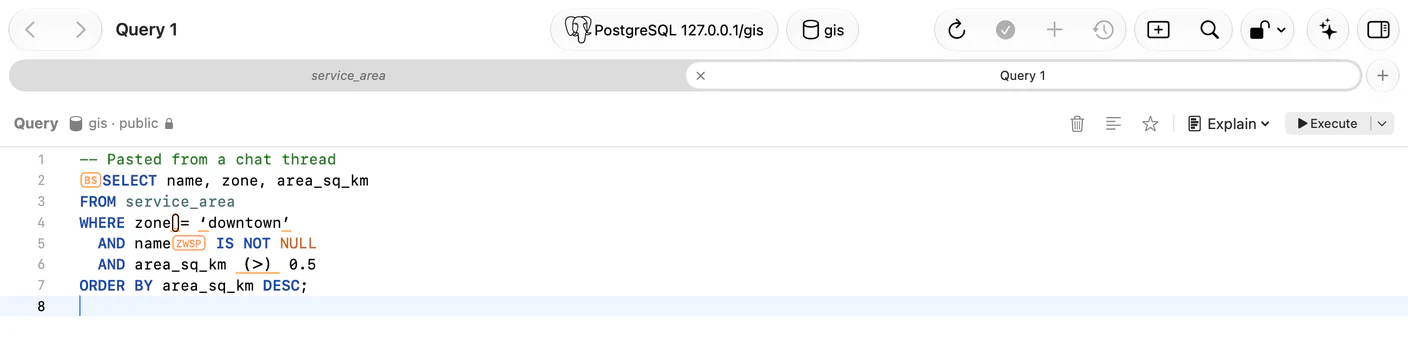
Characters you cannot see
#A statement holding a NUL character used to run only up to it on SQLite and PostgreSQL. A DELETE whose WHERE clause sat past the NUL ran without one.
Characters that draw as nothing, or as an ordinary space, are now marked where they sit. Control and formatting characters get a box with their short name, BS, NUL, ZWSP, BOM, RLO. Special spaces get an outline. Query > Remove Invisible Characters turns every flagged space into an ordinary one in one step, and Show invisible characters in Settings > Editor turns the marks off.
Full-width punctuation, curly quotes and non-ASCII spaces get an orange underline naming the ASCII character to type instead. Text inside quotes and comments is not checked, and none of it stops a query from running.
Control characters no longer arrive by typing either: a stray backspace from an input method, or a chord such as Ctrl+Option+H, is dropped.
Text that comes back the way you wrote it
#A comment or value reading メール where メール belongs was written by a client that sent UTF-8 while telling the server it was Latin 1. Set Encoding to UTF-8 via Latin 1 in Options and that database reads correctly, and what you save is stored the way the old client stored it.
The driver also sets the session character set rather than asking for it, so an init_connect running SET NAMES latin1 no longer leaves everything TablePro writes double-encoded, and every result cell is decoded by its own field's character set. The same class is gone on PostgreSQL databases not encoded in UTF-8, on iOS, and through a restore. On ClickHouse, one binary value in a result no longer garbles the text beside it.
Three more databases
#- Google Cloud Spanner: one connection is one database over Google's REST API, no host, no port, no tunnel. Connect reads the dialect, GoogleSQL or PostgreSQL, and quoting and catalog queries follow it
- Weaviate: collections are tables, objects are rows,
uuidis the primary key, and the editor speaks GraphQL - Cloudflare R2 SQL: read-only, over one R2 bucket with R2 Data Catalog turned on. It bills by the bytes each query scans
Install all three from Settings > Plugins. TiDB and Databend also arrive, as connection types on the MySQL driver.
Also new
#- Check connections in Settings > General, with Only when I use the connection for a server you would rather not have pinged. Idle metadata connections used to stay open for the life of the app, up to six per connection
- Refresh Materialized View… on PostgreSQL, concurrently where the view qualifies, plus Show DDL, Copy DDL and Edit Comment… for views and materialized views
- Max INSERT size for SQL export, 1 MB by default, with the largest INSERT written reported in the summary
- Marks on pending edits: a row queued for deletion is struck through, a new row or an edited value underlined
- UTF-16 LE, UTF-16 BE and Windows-1252 in the SQL import encoding menu
- A 5 MB smaller app bundle and a 7 MB smaller DMG
PostgreSQL 9.1 to 13
#Nineteen reads failed or answered wrong on older servers. The table list, foreign keys, triggers, check constraints, types and grants failed outright on 9.1 through 9.5. Sequences went missing from dumps of 9.6 and earlier, index column order was wrong on 9.4 and earlier, and backup and restore failed on 9.1 whenever the pg_dump found first was version 15 or later.
What it will not do
#A projected coordinate system draws nothing. SRID 27700 or 32633 gets you the SRID named in the pane and a request for ST_Transform(geom, 4326). Curved and polyhedral geometry is counted and named rather than drawn. Latitude past 85.05 degrees flattens to that value, so Arctic and Antarctic shapes land in the wrong place.
SQL Server, Oracle, DuckDB, SpatiaLite, Teradata, Trino, Spanner, Cassandra and BigQuery hand geometry over in formats the reader does not cover yet. Their spatial columns show text and carry no Map segment. The map is also one element to VoiceOver, so the grid stays the readable representation of spatial rows.
Highlight rules on a query result that does not come from one table are not saved. Saved rules stay on this Mac.
UTF-8 via Latin 1 is for a database written through a Latin 1 client, never one where applications write UTF-8. A correctly stored value you edit under it is saved in the garbled form.
Getting it
#TablePro checks for updates on its own, or TablePro > Check for Updates… now. A fresh copy is on tablepro.app. Help > What's New opens the full changelog, and Software Update settings carries the same link.
This release moves the plugin ABI to version 30. The change is additive, so the plugins you have keep working. Reinstall the MSSQL, BigQuery, Elasticsearch, DuckDB, MongoDB, Teradata, Cloudflare D1, libSQL, Snowflake and Dameng drivers from Settings > Plugins to pick up their fixes.
Related pages
Full release notes
Available for Mac, iPhone and iPad.
Download for Mac